|
Selecting Print from the
File menu or from the toolbar prints your document. To specify the labels
range to be printed, select the iBarcoder panel from the Print dialog.
'All' setting implies that one sheet of labels
will be printed. Entering values to 'From' and 'To' edit fields makes
iBarcoder calculate the number of pages automatically to print all the
labels from the specified range.
|
|
Print Direction setting changes printing direction of the sequential barcoders. Across attribute makes sequential barcodes change across page first, then down with a new row. When Down is selected, the barcodes change down page, then across it, with a new column.
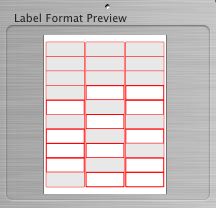 |
| You may also find useful to be able to select the first label on a page by clicking on that label in the Label Format preview box (left bottom of the iBarcoder window), or even selecting particular labels to be excluded from printing. To acomplish this, use click on the label with Command key pressed. |
|

